

Sunday, April 17, 2011


Friday, December 24, 2010
QR Code Images
 |  |
QR codes are 2D code images (black and white dots and bars) that have text encoded into them in several formats (text, URL, phone number, SMS), and can be read with qr code reader softwares, available online & in most smart phones.. they are also called "hardlinks" since they can serve as physical world hyperlinks.. you can simply read a printed or even artistically painted qr code image with ur phone & then it will open u the website url that is encoded in the qr image!! same as a soft hyperlink.. They can be and are used widely in marketing to attract traffic to certain websites or to hardlink a brand's website.. it can also be printed on T-Shirts, Mugs and can be formed with colored materials like coffee beans or M&Ms

qr stands for Quick Response
Audi Japan’s World’s Biggest QR Code (so far):
More:
Wikipedia: http://goo.gl/zahiN
QR Code Reader: http://goo.gl/mNdex
Google API: http://goo.gl/sB52F
Another QR Code Generator: http://goo.gl/JhWOG
QR Code Custom Designs:
 |  |
 |  |
 |  |
 |  |
Sunday, November 28, 2010
Packing Buddy
It's hosted live now, but the prototype is not yet finished, however I added a sample demo to be viewed, you may visit it here.
Still needs lots of work.. I need a UI designer/developer!!
Recent Recommendation :)
My manager said looking for a developer to recruit "I want someone like you" then he proceeded "in fact, there's no one like you!"
- Osama Darawsheh | Development Team Manager | Softact
- Osama Darawsheh | Development Team Manager | Softact
Wednesday, October 20, 2010

Wednesday, September 22, 2010
File Shredder
Do you have critical data files that you need to permanently destroy? you can use file shredders for this task, but if you're paranoid and don't want to run executables downloaded from untrusted resources, you can simply write your own file shredder, all you need is an IDE (e.g. Visual Studio, Net Beans.. etc.)
File Deletion Concept (OS 101):
The OS does not physically remove deleted files from your hard disk. Emptying your Recycle Bin does NOT protect you at all. Your sensitive files can be recovered, even after you format your hard disk! When you delete a file from Windows, the OS just marks the file as deleted in the file allocation table (FAT), but the data of the file is still on your hard disk, even though not accessable through the system friendly UI. There are many tools available which can let you or others easily recover your sensitive files even after you format your hard disk. Thus, make sure you ALWAYS shred your sensitive files if you plan to sell your PC later on.
A simple analogy would be like adding a new column to a database table to indicate if a record has been deleted, without actually deleting the record from the database. And in the system front-end, fitching only records of which the Deleted column is set negatively.

Technique:
The simplest technique to shred a file, is to overwrite the contents of that file multiple times with junk data before the file is deleted, so that the previous portions of the hard disk drive that were allocated to that file would be actually overwritten and untracable.
 Download Executable
 Download Source Code

Have a glance at the code
Main Function (DestroyFile) [Tip]: This function could also be implemented in a separate asynchronous thread to keep the main thread and UI responding and interactive with the user while the file is being shredded, because if the file size is too large, then the main thread (including the UI event handlers) will stop responding until the file shredding operation is completely executed.
File Deletion Concept (OS 101):
The OS does not physically remove deleted files from your hard disk. Emptying your Recycle Bin does NOT protect you at all. Your sensitive files can be recovered, even after you format your hard disk! When you delete a file from Windows, the OS just marks the file as deleted in the file allocation table (FAT), but the data of the file is still on your hard disk, even though not accessable through the system friendly UI. There are many tools available which can let you or others easily recover your sensitive files even after you format your hard disk. Thus, make sure you ALWAYS shred your sensitive files if you plan to sell your PC later on.
A simple analogy would be like adding a new column to a database table to indicate if a record has been deleted, without actually deleting the record from the database. And in the system front-end, fitching only records of which the Deleted column is set negatively.

Technique:
The simplest technique to shred a file, is to overwrite the contents of that file multiple times with junk data before the file is deleted, so that the previous portions of the hard disk drive that were allocated to that file would be actually overwritten and untracable.
Download ExecutableHave a glance at the code
Main Function (DestroyFile) [Tip]: This function could also be implemented in a separate asynchronous thread to keep the main thread and UI responding and interactive with the user while the file is being shredded, because if the file size is too large, then the main thread (including the UI event handlers) will stop responding until the file shredding operation is completely executed.
private void DestroyFile(string filePath)
        {
            try
            {
                FileStream filestream = new FileStream(filePath, FileMode.Open, FileAccess.Write);
                long length = filestream.Length;
                StreamWriter streamWriter = new StreamWriter(filestream);
                char[] buffer = new char[length];
                for (long i = 0; i < length; i++)
                {
                    buffer[i] = '0';
                }
                streamWriter.Write(buffer);

                streamWriter.Close();
                filestream.Close();

                File.Delete(filePath);
            }
            catch (Exception ex)
            {
                MessageBox.Show(ex.Message, "Error!");
            }
        }
Wednesday, August 25, 2010
Cloud Computing: Web-Based Screen Recorder
I have previously blogged about CodeRun the cool browser-based IDE, I find the cloud-computing concept as a whole is exciting regardless of the endless debates that we can have about the security and controllability.
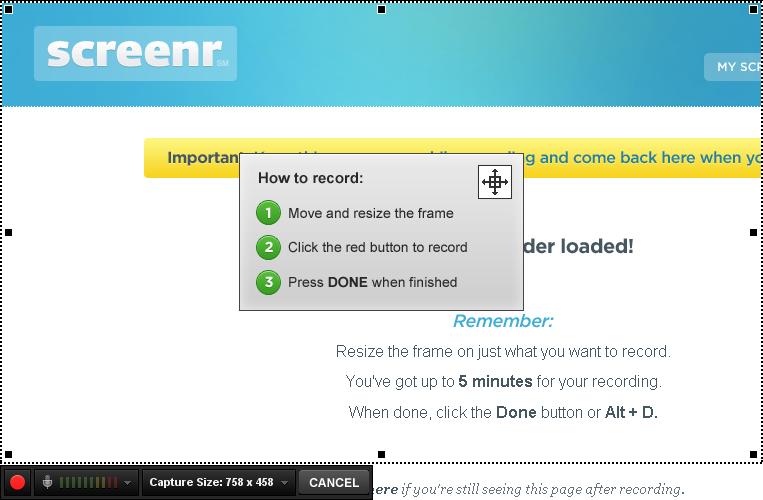
Moreover, I recently came across this web-based screen recorder Screenr that allows you to quickly record and screencast!
The product is java-based and -of course- cross-platform, no need for download or installation.

Moreover, I recently came across this web-based screen recorder Screenr that allows you to quickly record and screencast!
The product is java-based and -of course- cross-platform, no need for download or installation.
Tuesday, August 3, 2010
Cloud Development
CodeRun Studio is a cross-platform Integrated Development Environment (IDE), designed for the cloud. It enables you to easily develop, debug and deploy web applications using your browser.
CodeRun Studio can be used instead or alongside your existing desktop IDE. You can upload existing code in order to test it in the cloud or for sharing with your peers.
CodeRun Studio can be used instead or alongside your existing desktop IDE. You can upload existing code in order to test it in the cloud or for sharing with your peers.
Monday, July 26, 2010
Web Automation - Intro
Did you know that you can automate your daily repetitive tasks that you do on the web, and save yourself time and effort!
This is a very simple automation sample, the automation simulates the user web browsing, I built 2 automation samples:
Download Executable you also need to check Microsoft.mshtml.dll (?)
Download Source Code
You can also build your own toolbar to the browser with your customized buttons, for example you can add a button that will collect all the images in a web page.. whatever comes to your mind!
You can also use this concept to build automated tests for your web applications, simulating the end user browsing activities.
A quick look at the code
In the event handler of the click event of the sub-menu "Automate My Blog", I attach a new event handler to the DocumentComplete event of the WebBrowser, and navigate the web browser to my blog's "Contact Me" page url, and then wait for the event handler to be invoked to complete the automation.
In the sub menu click event handler:
In the WebBrowser document complete event handler, I find the yahoo mail link object, and click on it:
This is a very simple automation sample, the automation simulates the user web browsing, I built 2 automation samples:
- Automate Google Search: will navigate to google website, enter "Dareen Alhiyari" in the search textbox, and then click the search button.
- Automate My Blog: The second automation will navigate to my blog's "Contact Me" page, and then click on my yahoo email link.
Download Executable you also need to check Microsoft.mshtml.dll (?)You can also build your own toolbar to the browser with your customized buttons, for example you can add a button that will collect all the images in a web page.. whatever comes to your mind!
You can also use this concept to build automated tests for your web applications, simulating the end user browsing activities.
A quick look at the code
In the event handler of the click event of the sub-menu "Automate My Blog", I attach a new event handler to the DocumentComplete event of the WebBrowser, and navigate the web browser to my blog's "Contact Me" page url, and then wait for the event handler to be invoked to complete the automation.
In the sub menu click event handler:
try
{
    this.webBrowser1.DocumentCompleted += new WebBrowserDocumentCompletedEventHandler(webBrowser_DocumentCompleted_AutomateMyBlog);
    this.webBrowser1.Navigate("http://dareen-h.blogspot.com/p/contact-me.html");
}
catch (Exception ex)
{
    MessageBox.Show(ex.Message, "Error!");
}
In the WebBrowser document complete event handler, I find the yahoo mail link object, and click on it:
try
{
    IHTMLDocument3 doc = this.webBrowser1.Document.DomDocument as IHTMLDocument3;
    if (doc != null)
    {
        IHTMLElement yahooMail = doc.getElementById("yahoomail");
        if (yahooMail != null)
        {
            yahooMail.click();
        }
    }
}
catch (Exception ex)
{
    MessageBox.Show(ex.Message, "Error!");
}
finally
{
    this.webBrowser1.DocumentCompleted -= new WebBrowserDocumentCompletedEventHandler(webBrowser_DocumentCompleted_AutomateMyBlog);
}
Microsoft.mshtml.dll
You will need Microsoft.mshtml.dll that usually ships with IE, to make sure if you have it installed in the GAC, open Start Menu->Run and type assembly then hit enter, the GAC folder will open up, make sure that you have the dll in the dlls list
 If you don't find the dll in the list, you may download Office 2003 Update that contains the dll, or if you find it too big for you, you may download it from dll download websites
After you get the dll, drag it and drop it into the assembly folder "%OS Drive%\Windows\Assembly"
You will need Microsoft.mshtml.dll that usually ships with IE, to make sure if you have it installed in the GAC, open Start Menu->Run and type assembly then hit enter, the GAC folder will open up, make sure that you have the dll in the dlls list

After you get the dll, drag it and drop it into the assembly folder "%OS Drive%\Windows\Assembly"
Wednesday, July 14, 2010
Build impressive flash dashboards and charts
Open Flash Chart is a cool open source flash project that allows you to easily embed impressive dashboards and charts into your website or business portal.
This is one of the 3D-bar chart samples:
And a glass bar chart sample:
The data from which to build the charts can be extracted from any data source or database, and saved into an array that is passed to the OFC library to build the chart.
The basic tutorial in the website shows how to integrate the flash chart along with the data file into your page.
Of course you will have to do some tweaks here and there like changing some include paths, renaming some folders... etc. But the cool result is worth the hassle ;)
I will be posting a detailed step-by-step tutorial of how to build and integrate the charts into a PHP5 website once I get some time.
This is one of the 3D-bar chart samples:
And a glass bar chart sample:
The data from which to build the charts can be extracted from any data source or database, and saved into an array that is passed to the OFC library to build the chart.
The basic tutorial in the website shows how to integrate the flash chart along with the data file into your page.
Of course you will have to do some tweaks here and there like changing some include paths, renaming some folders... etc. But the cool result is worth the hassle ;)
I will be posting a detailed step-by-step tutorial of how to build and integrate the charts into a PHP5 website once I get some time.
Subscribe to:
Posts (Atom)